Solution architecture
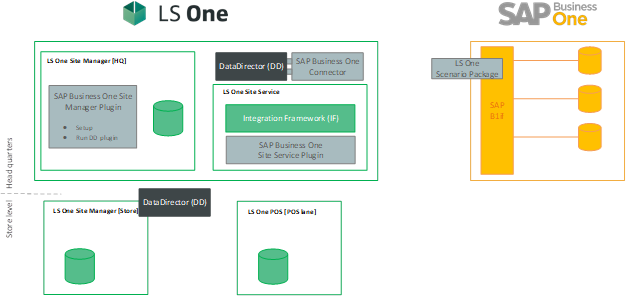
Components at Head Quarters
The connection between SAP Business One and LS One is done at the head quarter level. At the head quarter the information about items, customers, etc. flows from SAP Business One to LS One and vice versa the transaction information flows from LS One head office to SAP Business One. For this to work we need the following components:
LS One Site Manager
The LS One back office system is called the Site Manager. This is where you will control how your POS looks and works, set up your users, create retail specific discount offers and much more. The Site Manager works on a SQL database.
LS One SAP Business One Plug-in
The LS One back office system, the Site Manager, has a plug-in-based framework where additional functionality and UI components can be added to the system by adding a plug-in The LS One SAP Business One Plug-in adds functionality to the Site Manager where the user sets up their connection to the SAP Business One Integration Framework.
The plug-in allows the user to map LS One sites to SAP Business One warehouses and set which accounts to post the different parts of the transactions to.
Data Director
The Data Director is a data replication tool that all LS Retail product use to keep the HQ, stores and terminals in sync. The Data Director runs jobs on a schedule to send data between two defined locations/databases.
In the connection between SAP Business One and LS One the Data Director is used to pull data from SAP Business One to LS One and push transactions from LS One to SAP Business One.
SAP Business One Connector
The Data Director can also run methods from a plug-in. The LS One SAP Business One Connector is a Data Director plugin that contains different methods to trigger the LS One SAP Business One Scenarios to send data to LS One. A job is created in the Site Manager that runs a specific method in the SAP Business One Connector which then triggers a set of scenarios in the B1if. The jobs are run from the Site Manager either manually or on scheduled intervals. For an example item updates could be sent every night during slow time at the store and office.
LS One Integration Framework
LS One has its own WCF web service called Site Service. When a SAP Business One scenario is called and B1if is requested to replicate data to LS One, the data is sent through the Site Service/Integration Framework and updates the LS One database at HQ level.
LS One SAP Business One Scenario Package
The LS One SAP Business One Scenario Package includes all scenarios needed for LS One to retrieve the required data from SAP Business One.
See further documentation about the scenario package here.
Components at store level
LS One supports multistore environment and as the connection between LS One and SAP Business One is done at the head quarter level we need to make sure the information from SAP Business One flows seamlessly from the LS One head quarters to all stores and terminals within the organization.
The following components are used at the store level:
LS One POS
The LS One POS is the point of sale application in which you sell your items to the customer. The POS handles all major retail specific functionality such as returns, complex discount mechanism, gift cards, credit memos and loyalty to name a few.
The LS One POS works on a SQL database the database can be located on each POS machine running on Microsoft SQL Express server. This is called offline mode.
LS Data Director
In an LS One multistore environment LS Retail’s data replication tool the Data Director is used to send data from the head office to the stores and terminals and pull transaction data from the terminals to the head quarters.
When information has been sent from SAP Business One to the LS One head quarters the data director will run data synchronization jobs that are included in the LS One data on a schedule to forward the data from SAP Business One to the stores and terminals.


